MotionLab CaptureIn development · Private beta

ON-DEVICE MOTION STUDIO · iPHONE + iPAD

Turn video into editable 3D motion.

Capture or import a short clip. Review and refine the movement on your iPhone or iPad, without uploading your video for analysis. Then take it into your creative workflow.

Not yet available on the public App Store.

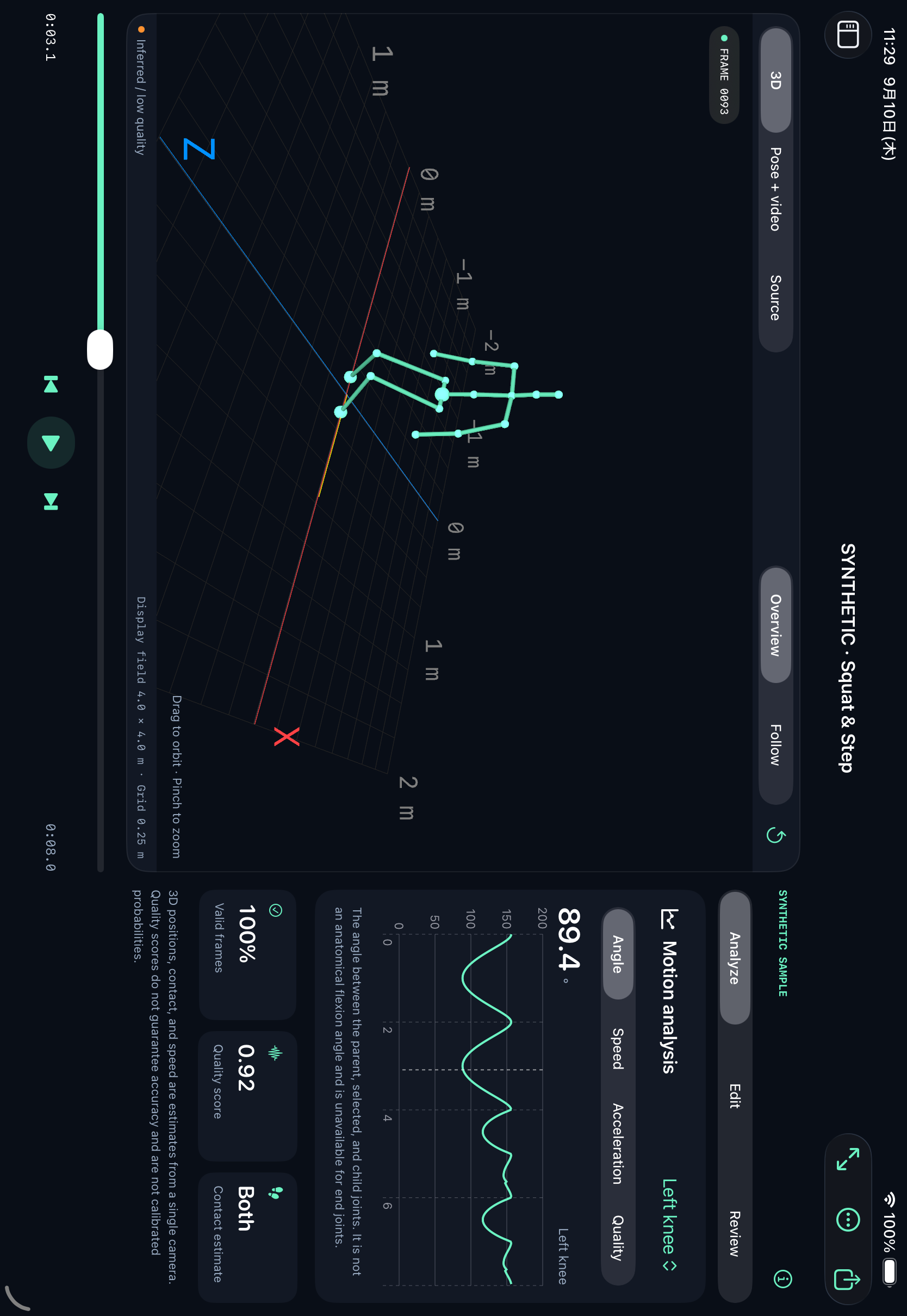
MotionLab Capture's English iPad landscape studio, with a synthetic skeleton, timeline and analysis panel.
Actual app UI in iPad Simulator. Synthetic sample motion, not a video-analysis result or evidence of capture accuracy.

On your device

Video analysis stays on iPhone or iPad.

In your hands

Keep raw estimates. Refine what comes next.

Into your workflow

Six formats, including the free allowance.

FROM CLIP TO CREATIVE MATERIAL

Record. Review. Refine. Export.

A starting point for animation and movement studies—not a black box that takes the final decision away from you.

  1. Bring a clip

    Record in the app or import from Photos or Files. A fixed camera, a visible full body and good lighting give the analysis a better starting point.

  2. Shape the motion

    Move between source video, a skeleton overlay and a 3D preview. Scrub the timeline, step through frames and adjust individual joint positions.

  3. Take it further

    Choose a motion or data format for your next tool. Keep a restorable project JSON and save the source video separately.

A STUDIO THAT FITS iPAD

Room to see. Tools to refine.

On a wide iPad layout, keep the motion preview beside analysis, correction and review panels. Focus the preview when you need a closer look; controls adapt to narrower windows.

Keep the raw. Control the correction.

Raw estimates and corrected frames remain separate. Edit joint X, Y and Z positions, undo changes or restore raw values. Recalculate corrections from saved raw estimates as a new version without replacing the original.

Review the uncertain parts.

Jump to flagged intervals and compare two clips on a normalized timeline. Missing joints and uncertain estimates deserve a closer look; quality flags are review aids, not accuracy certificates.

Recalculating saved estimates does not consume a new analysis. Analyzing the source video again does. Clip comparison aligns relative time, not movement events automatically.

SIX WAYS OUT

Your motion is a beginning. Not a dead end.

Choose the format that fits the next step. All six export formats are included in the free allowance; the data still needs to meet each format's requirements.

JSON
Project data and restoration
CSV
Frame-by-frame inspection
BVH
Skeleton animation
GLB
3D preview and animation
FBX
Binary skeleton animation
Pose MP4
Pose video + companion pose JSON
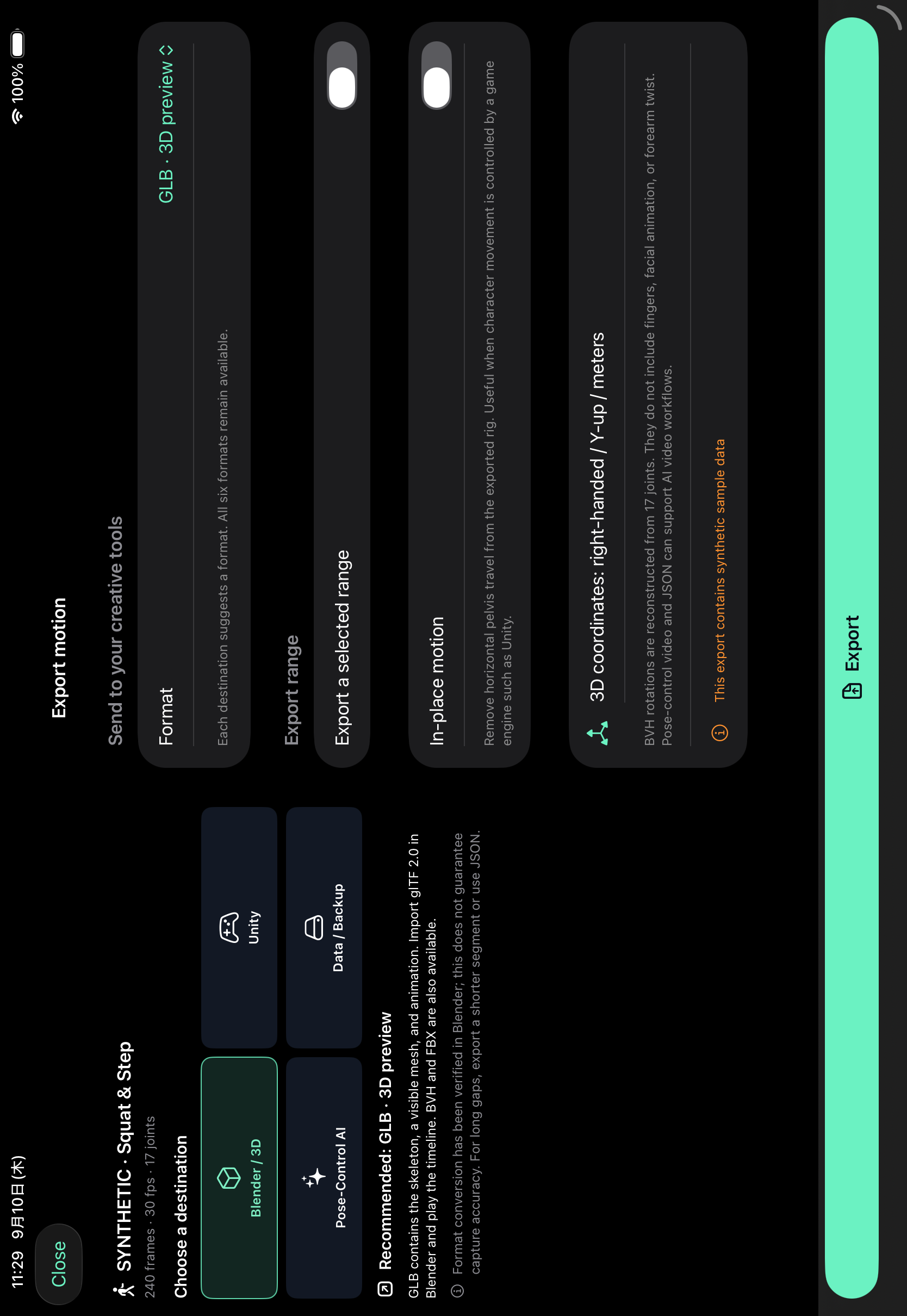
MotionLab Capture's English landscape export guide showing a synthetic sample and the GLB format.
Actual app UI in iPad Simulator, using synthetic sample data. Destination labels are guidance, not a guarantee of compatibility with every tool.

BVH, GLB and FBX imports have been checked in Blender 4.5.12 using synthetic test motion. This verifies format handling—not camera capture accuracy or retargeting to every character rig.

Long gaps or unusable motion can prevent continuous animation exports. Export a suitable shorter segment, or use JSON/CSV to preserve missing-data information. Unity Editor compatibility and a public companion importer are not yet verified for release.

LOCAL ANALYSIS, BY DESIGN

The video stays with you.

Body-pose estimation runs on your device with Apple's Vision framework. No video upload for analysis, no external model download and no app-specific account to get started.

Purchases and restoration use Apple's services. Sharing sends files to the destination you choose. Local storage is not a cloud backup: export the main project JSON and keep the source video separately.

TRY THE WORKFLOW BEFORE YOU SUBSCRIBE

Start small. Keep every export option.

Planned public-release offering. The app is currently in private beta; subscriptions are not being sold through this page.

Free allowance

3 successful analyses

Up to 30 seconds each · per device

Only successfully saved new analyses count. Failed or cancelled analyses and clips with no detected person do not use the allowance. All six export formats are included.

No subscription signup. No automatic charge or conversion to Creator.

Creator · planned monthly subscription

Up to 60 seconds

Per new analysis · no app-imposed run-count limit

Planned launch price: US$9.99/month in the US and ¥1,500/month in Japan. Final availability and the price shown by the App Store at purchase govern; other local prices are not promised.

Creator is an auto-renewing subscription when purchased. Saved projects remain available for editing, export, recalculation and JSON restoration after it ends.

A FEW THINGS WORTH KNOWING

Clear possibilities. Honest boundaries.

What does it capture?

An estimated 17-joint 3D body skeleton from a single video. It does not provide a 3D finger or facial-animation rig. Optional 2D hand/face points and hidden-leg completion are supplementary estimates, not measured 3D detail.

Can I move the camera?

Use a fixed camera, keep the person fully in frame and obtain the necessary filming consent. There is no camera-motion compensation. Occlusion, lighting and camera angle can affect the result.

Is this a medical or precision measurement tool?

No. It is a creative and review tool, not a medical device or a substitute for validated measurement systems. Joint positions, angles and contact indicators are estimates; the app does not guarantee capture accuracy.

Are my projects backed up automatically?

No developer cloud backup is provided, and app-owned videos, projects and exports are excluded from device backups. Before deleting the app or changing devices, save the main project JSON and source video separately. The JSON does not contain the source video.

When and where can I use it?

MotionLab Capture is in development and private beta, not a public App Store release. It targets iPhone and iPad with iOS/iPadOS 17 or later. The app UI supports English and Japanese; the planned initial storefronts are the US and Japan. These web translations do not imply availability in other regions or additional app languages.
Make movement part of your creative process.

Have a workflow in mind? Tell us what you want to make with MotionLab Capture.